
Custom Cable Assembly vs Standard SATA Cable: Which Is Better for NAS, Edge AI, and Industrial PCs in 2026?
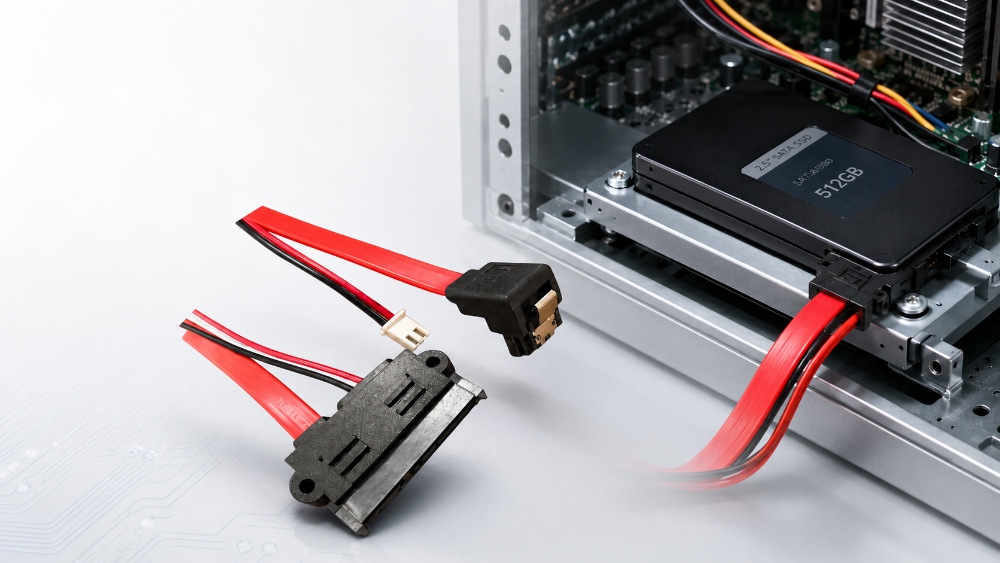
For NAS systems, edge AI devices, industrial PCs, and compact storage equipment, the better cable choice depends on more than the connector type. A standard SATA cable can work well in a simple desktop layout, where space is open, and the drive connection is easy to reach. But when the equipment has a tight enclosure, fixed drive bays, vibration risk, or a defined production process, a custom cable assembly often gives engineers better control over routing, installation, and long-term connection stability.
This is why SATA cable selection still matters in 2026. Many storage designs now sit inside smaller devices, yet they still need stable data transmission, clean power delivery, and service-friendly internal wiring. The question is not whether a standard cable is unsuitable. The real question is whether it matches the structure and working conditions of the equipment.
Why SATA Cable Selection Still Matters in 2026 Storage Devices
SATA remains common in many storage products because not every device needs the highest-cost interface or the most complex storage architecture. NAS units, security storage systems, industrial computers, external hard drive enclosures, and some edge devices still use SATA connections for hard drives, optical drives, and disk arrays.
The challenge is that modern equipment rarely gives cable designers much extra room. A compact NAS may have several drive bays, a small motherboard, a power module, and limited airflow space. An industrial PC may need to fit storage, I/O boards, and internal wiring inside a rigid housing. A security storage system may run for long periods and require stable drive connections with less chance of accidental loosening.
In these cases, the cable becomes part of the equipment layout. It affects how the device is assembled, how easy it is to maintain, and how stable the connection remains after repeated handling or long operation. A low-cost cable that looks acceptable during prototype testing can still create problems during batch assembly if the length, angle, connector fit, or routing path is not well matched.
Standard SATA Cable vs Custom Cable Assembly
A clear comparison starts with the device structure. The same SATA interface can behave differently when it is used in a desktop PC, compact NAS, server disk array, or industrial control device.
When a Standard SATA Cable Is Enough
A standard SATA cable is suitable when the equipment has enough internal space, and the connection path is simple. It works well when the drive is easy to access, the cable does not need a fixed mounting point, and the system does not require a special length, color, wire gauge, or power terminal.
This option is also useful for repair, testing, and small-volume use. It is easy to source and simple to replace. For an open chassis or a basic desktop storage connection, that may be enough.
The limitation appears when the device layout becomes more demanding. A cable that is too long can create clutter. A cable that is too short may pull against the connector. A straight connector may press against the housing wall. Separate data and power cables may make the inside of the device harder to organize. These issues are not always visible in a product photo, but they matter during assembly and service.
When a Custom Cable Design Works Better
A project-specific design is usually better when the cable must fit the enclosure, drive bay, PCB position, and production process. This is where cable assembly planning becomes more valuable than choosing a basic off-the-shelf part.
Engineers should review the interface direction, wire length, bending path, fixing method, conductor specification, and power connection before finalizing the design. For B2B equipment, this review also helps reduce production variation. A cable that fits the internal layout from the beginning can make assembly cleaner and make service work more predictable.
This logic also applies to cable harness design. A cable harness is not only a group of wires. It is a structured connection system that must support the equipment layout, installation sequence, and inspection process. The same principle applies to wire harness assembly work, especially when storage, signal, and power connections must stay organized in one compact space.
Key Factors to Check Before Choosing a SATA Cable
A good decision should start from real equipment needs. Price matters, but it should not be the only factor. The cable must work inside the device, not just match the interface name.
Connector Direction and Internal Clearance
The connector direction often decides whether the cable fits well. A straight SATA connector is practical when the space in front of the drive or board is open. A right angle SATA cable is better when the connector sits close to a wall, drive bay, or other internal component.
A 90° design can reduce bending pressure near the interface. It can also help the cable follow the enclosure shape more naturally. This is useful in NAS systems, external storage units, security storage devices, and industrial PCs where every millimeter of routing space matters.
Data and Power Integration
Some devices use separate SATA data and power cables. This can work in simple layouts, but it may create more routing work in compact equipment. A SATA data and power cable can simplify internal wiring by bringing both connection needs into a more organized form.
Integrated wiring not only makes the inside look cleaner. It can also reduce installation steps and help operators place the cable more consistently during production. For OEM projects, repeatability can be important. The final cable choice should support the equipment design, assembly method, and service path.
Length, Wire Gauge, and Production Repeatability
Cable length should match the actual routing path. Too much spare length creates loose loops. Too little length adds stress at the connector. Both can affect assembly quality.
Wire specification also matters. The cable must match the electrical and mechanical needs of the device. In storage equipment, data transmission and power supply both need stable connection paths. For power delivery, the wire gauge may need adjustment based on project requirements. For data transmission, the selected data cable must support the required SATA standard.
Production repeatability is another key point. A cable may perform well in one sample, but the real test is whether it can be assembled the same way across a batch. That is why many engineering teams review cable routing together with connector position, housing structure, and inspection steps before mass production.
Where a Right Angle SATA 7+15P Fixed Cable Fits
Not every storage device needs a special design, but many compact systems benefit from one. This is where LUONYX can be introduced in a practical way. For equipment that needs a fixed SATA data and power connection, the design should support both stable transmission and stable installation.
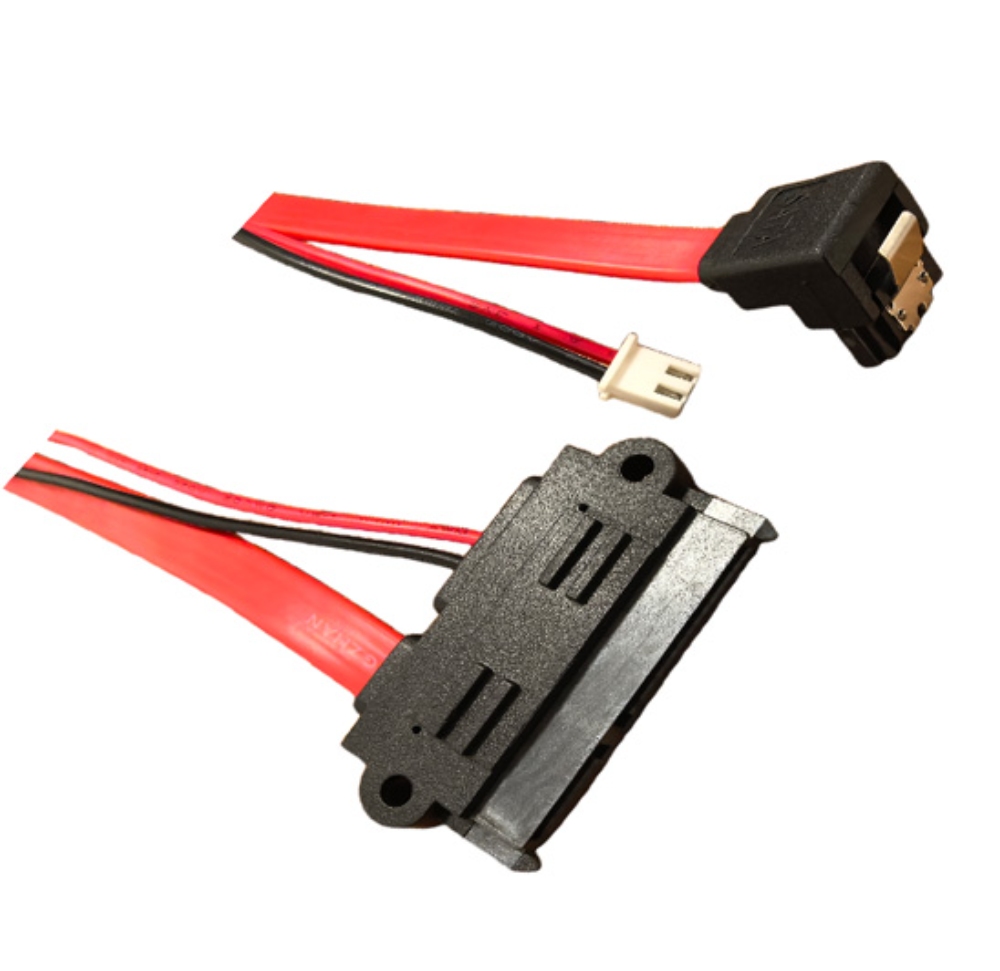
The Professional SATA 7+15P Right Angle Fixed Cable is a suitable example. It combines a SATA 7-pin data interface with a 15-pin power interface. The data interface uses a 90° right angle structure, which helps the cable fit compact internal layouts. The molded housing includes screw fixing holes, and the 7-pin interface has a built-in metal spring clip to reduce the risk of disconnection.
The data cable uses UL2725 26AWG red cable. The power cord wire gauge can be customized. Cable color and length can also be adjusted based on project needs. For storage equipment that requires stable internal routing, this kind of structure can be more suitable than a loose standard layout.
Its application range also matches common storage designs, including desktop computers, server disk arrays, external hard drive enclosures, industrial control equipment, and security systems. These are the types of devices where cable position, installation stability, and internal organization are often more important than they first appear.
Practical Comparison for B2B Equipment Design
The best choice is not fixed for every project. The right answer depends on the device type, internal space, installation method, and production scale.
| Best fit | Simple desktop or open layouts | NAS, edge AI devices, industrial PCs, storage systems |
| Connector direction | Often straight or limited options | Can use right angle routing when space is tight |
| Cable length | Fixed or limited choices | Can be matched to the enclosure |
| Data and power routing | Often separate | Can combine data and power paths |
| Installation stability | Depends on connector fit | Can include screw fixing and anti-loosening design |
| Production use | Good for simple sourcing | Better for repeatable OEM assembly |
| Internal appearance | May create extra cable slack | Cleaner routing inside the device |
A standard option is still useful when the device is simple, and the environment is controlled. But for storage equipment with dense components, fixed drive positions, or long operating cycles, a more tailored cable design usually gives the engineering team better control.
This is also why early technical review matters. A cable selected late in the project may force the team to accept routing compromises. A cable selected during the enclosure and interface planning stage can fit the design more naturally.
How Engineers Should Make the Final Decision
Before choosing a cable, engineers should review the complete connection path. Start with the drive position and board layout. Check whether the connector area has enough clearance. Then review the bending direction, fixing point, power requirement, and service access.
If the cable must pass through a narrow space, a right angle design may be necessary. If the device needs a cleaner internal layout, integrated data and power wiring may help. If the system may face vibration or repeated handling, screw fixing and anti-disconnection design should be considered.
For OEM and ODM projects, the decision should also include sampling, inspection, and batch consistency. A wire harness assembly that fits the enclosure well can reduce small variations during production. It can also make repair and replacement easier later. Teams that need support from design review to production can review OEM and ODM cable manufacturing options before locking the final cable structure.
The main goal is simple: the cable should match the equipment, not force the equipment to work around the cable.
Final Recommendation
A standard SATA cable is a practical choice for simple storage connections, open layouts, and low-complexity assembly. It is easy to source and easy to replace. For many basic desktop applications, it remains a reasonable option.
For compact NAS systems, edge AI storage devices, industrial PCs, server disk arrays, external storage enclosures, and security systems, the stronger choice is often a design built around the product structure. A right angle connector, integrated data and power design, screw fixing, anti-disconnection structure, customized length, and suitable power cord specification can make the cable fit the equipment more precisely.
The final decision should not be based only on interface type. It should be based on space, routing, stability, assembly, and long-term use. If your project needs a storage cable solution for a compact or industrial device, you can send us your cable requirements and discuss the connector direction, cable length, fixing method, wire specification, and production needs.
FAQ
Q: Is a custom cable assembly always better than a standard SATA cable?
A: No. A standard SATA cable is suitable for simple layouts with enough space and no special fixing needs. A project-specific cable is better when the device has tight routing, fixed drive bays, vibration risk, or OEM production requirements.
Q: What is a SATA 7+15P cable used for?
A: A SATA 7+15P cable combines the 7-pin data interface and 15-pin power interface. It is used in storage devices that need both data transmission and power supply, such as hard drives, disk arrays, industrial computers, and security storage systems.
Q: Why use a right angle SATA cable in compact equipment?
A: A right angle SATA cable helps reduce connector-side bending when the drive or PCB sits close to the housing wall. It can make internal routing cleaner and improve the fit inside compact NAS, industrial PC, and external storage designs.